
Capability
Transcription that runs on your Mac
Rooster transcribes inside its own process rather than calling a service. Parakeet TDT v3 is the default and downloads its own models; whisper.cpp is selectable for the languages Parakeet does not cover. Both produce word-level timings, which is what lets the transcript drive the edit.
Two local engines, and one you bring yourself
The default engine is Parakeet TDT v3, which on Rooster's own fixtures matched whisper.cpp large-v3-turbo for accuracy at 13 to 28 times the speed and a fraction of its peak memory, and which covers 25 European languages. That figure is ours, measured on those fixtures, and it belongs to that comparison rather than to any machine you happen to own. Its models download on the first transcription, about 480 MB, so a new installation transcribes without you finding a model file first.
whisper.cpp stays selectable for the roughly 99 languages Parakeet does not cover. It reads a GGML model file you download and point Rooster at, and Settings says whether a Core ML companion is installed beside it, because that is what decides how fast it runs.
The third option is a bring-your-own-key one: an OpenAI-compatible endpoint, with the base URL, the model name and a key kept in the macOS Keychain. That is the one transcription path where audio leaves the Mac, and it happens only if you deliberately configure it. The settings panel says so where you configure it rather than in a footnote.
A recording or an import is transcribed as its project is created, unless you turn that off. A run reports how far through it is where the engine can say so and shows an honest spinner where it cannot; a failure stays on screen next to a retry rather than passing through an alert; and a run that reached the end and found no speech says that, rather than claiming it failed.
What is on screen
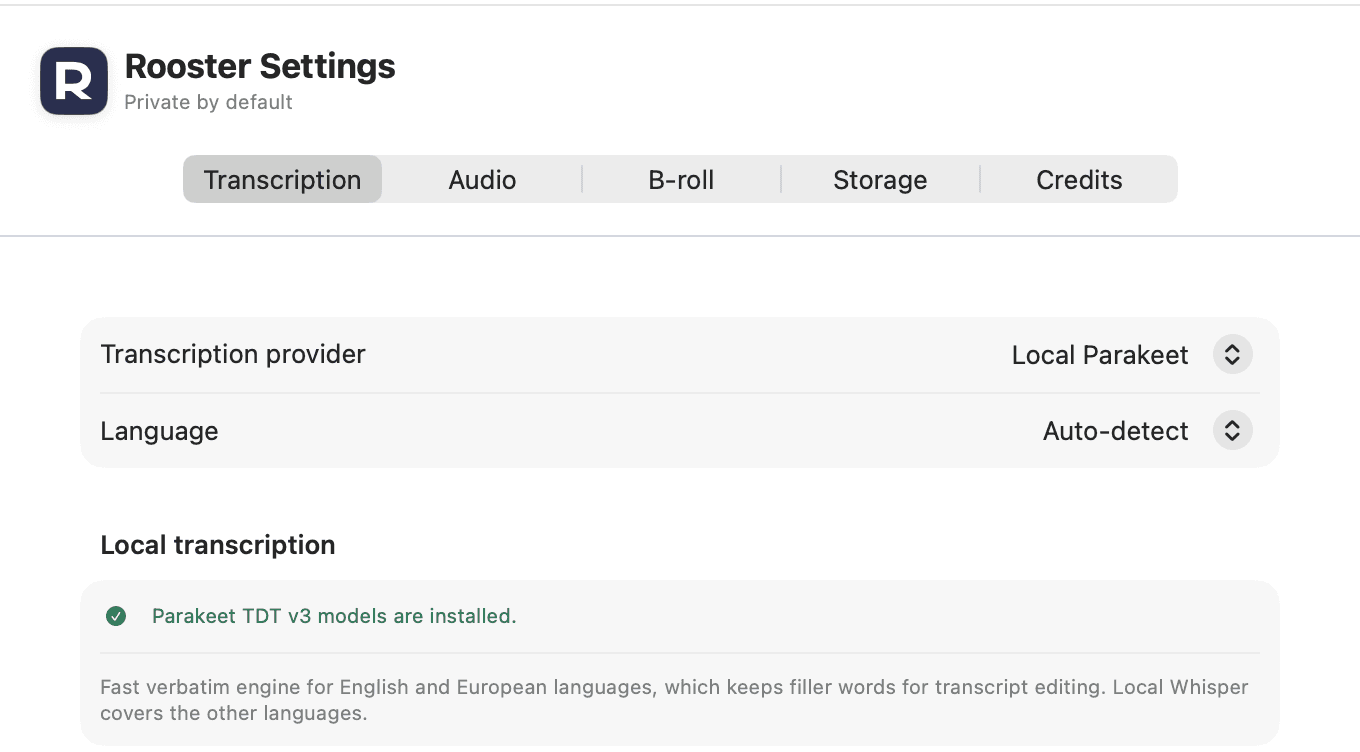
Transcription provider
Settings offers Local Parakeet, Local Whisper and Cloud API. Parakeet is the default on a new installation, and an existing one keeps whatever it was already set to.
Language
Auto-detect, plus English, French, German, Spanish, Italian, Portuguese, Japanese and Chinese. With Parakeet selected, choosing a language it does not transcribe puts a line under the picker telling you to switch to Local Whisper.
The Whisper model file
Local Whisper reads a GGML model you point it at, with a link to where those are published and a line reporting whether a Core ML companion is installed for it.
Parakeet's models
Downloaded on the first transcription, about 480 MB. Settings says whether they are already installed, so the first run is not a surprise.
Transcribe when recording ends
On by default, and a toggle in the recorder. Beside it, a line naming the engine the recording will be handed to and saying whether the audio stays on this Mac.
Progress, cancellation and retry
Every entry point - the recorder, the Transcribe button and the retry - runs through one code path, so a transcription started before the editor opened is already visible when it does.
Every capability Rooster ships is listed on the features page, and how the work is split between your Mac and everything else is on how it works.
How to use it
Transcribe a video on your Mac
How Rooster transcribes a recording on your Mac, the one-time speech model download, choosing a language or engine, and transcribing again.
Correct the transcript without changing the video
Fix a misheard word or name in a Rooster transcript, correct every place it appears at once, type over the script in Correct mode, and undo a correction.
Teach Rooster to spell names your way
Add names, brands and jargon to Rooster's transcription glossary so every new transcript spells them your way, and undo a respelling you did not want.
The 25 languages it transcribes on your Mac
Parakeet TDT v3 is the default engine and runs on your Mac. It detects the language itself, and these are the ones it is documented to transcribe. If yours is not here, Parakeet will not do it - whisper.cpp is selectable instead and covers roughly 99 languages, but you supply the model file yourself.
- Bulgarian
bg - Croatian
hr - Czech
cs - Danish
da - Dutch
nl - English
en - Estonian
et - Finnish
fi - French
fr - German
de - Greek
el - Hungarian
hu - Italian
it - Latvian
lv - Lithuanian
lt - Maltese
mt - Polish
pl - Portuguese
pt - Romanian
ro - Russian
ru - Slovak
sk - Slovenian
sl - Spanish
es - Swedish
sv - Ukrainian
uk
This is what the engine covers, not what you can name. The Language setting offers auto-detect and eight languages by name - English, French, German, Spanish, Italian, Portuguese, Japanese and Chinese - and the last two are whisper.cpp's rather than Parakeet's. For any of the other languages above, leave it on auto-detect.
Coverage read from NVIDIA's model card for Parakeet TDT 0.6B v3, checked 2026-09-02.
What it does not do
- The language picker offers auto-detect and eight named languages. Parakeet's documented coverage is 25 European languages and whisper.cpp covers the rest, but naming a language yourself is limited to that list.
- Local Whisper needs a GGML model file you download and point Rooster at. It does not fetch one for you. Parakeet does.
- Nothing in Rooster decides who is speaking. You can select a passage in the transcript and name the speaker yourself, and that name goes into SRT and VTT - but Rooster never works one out for you, so a transcript is not diarised.
- Cloud API is the one path where audio leaves your Mac. It goes to the endpoint you configured and nowhere else, and it exists because some people would rather use a service they already pay for.
- A transcription interrupted by quitting Rooster is not resumed on the next launch. You start it again from the transcript panel.
This list is here because the alternative is a reader installing Rooster and finding out. If one of these is the job you need done, the alternatives page ranks tools that do it.
Frequently asked questions
Does Rooster upload my video to transcribe it?
Not with either local engine. Parakeet and whisper.cpp run inside Rooster's own process on your Mac. The exception is the Cloud API provider, which sends the prepared audio to the OpenAI-compatible endpoint you configured, and which is only used if you choose it.
Which engine should I use?
Parakeet is the default and the fast one, and it is verbatim, so it keeps the filler words that transcript editing needs. Local Whisper is the one to choose for a language Parakeet does not cover. Cloud API is there if you would rather use a service you already pay for.
Do I have to download a model?
Parakeet downloads its own on the first transcription, about 480 MB. Local Whisper is the one that needs a GGML model file you supply; Settings links to where they are published.
Does the transcript carry word-level timings?
The local engines produce them, and they are what word-accurate cutting and word-by-word caption highlighting are built on. Where a transcript has none, Rooster says so rather than quietly doing less: the caption panel disables word-by-word highlighting and explains why in the panel itself.
Can Rooster tell speakers apart?
Not on its own. There is no diarisation in Rooster, so a two-person recording transcribes as one run of text - but you can select a passage, name the speaker, and have that name go into the SRT and VTT sidecars.
The rest of the loop
Screen recording on your Mac
A display or one window, with Mac audio and your microphone, cropped to the shape you are publishing in.
Captions from your own transcript
Four presets over the transcript's own timings, adjustable down to the outline, burned into the export and written as SRT and VTT.
Removing filler words
Every hesitation in the transcript, played in context, cut as one undoable step when you approve it.
Studio Sound
DeepFilterNet 3 on your Mac, with a strength control and A/B playback before anything is kept.
Eye Contact
A restrained, on-device gaze correction with three strengths and A/B playback. Beta, and labelled so in the app.
The teleprompter in Rooster's recorder
A script window opened from the recorder that scrolls continuously, keeps the script with the project, and has mirror and flip settings for a beam splitter.