
Capability
Captions from your own transcript
Captions are built from the transcript's timings, so there is no second transcription and no upload. Four presets preview on the canvas as you pick one, then adjust: typography, colour, outline, shadow, placement, and how many characters a line holds. Export burns them into the video and writes SRT and VTT.
How captions are made
Captions come from the transcript, which means the video has to be transcribed first. The caption panel says exactly that rather than leaving a gallery of styles mysteriously inert.
There are four presets. Classic is a readable box caption and the safe default for any video. Clean Paragraph drops the background and takes a larger line budget, for talking-head video where the picture should stay visible. Bold Highlight is short, heavy cards for short-form social video watched without sound. Karaoke highlights each word as it is spoken, driven by the per-word timings the local engines produce.
Each one previews on the canvas the moment you pick it, and the View menu can draw safe-area guides so nothing lands where a platform's own interface will cover it. Those guides are drawn on the canvas only and never reach a render.
Captions burn into the exported video through the same composition path the preview uses, which is why what you see and what renders are the same thing rather than two implementations that agree most of the time. SRT and VTT sidecars are written from the same cues, with the same line and card limits. Generating captions and removing them are both recorded as undoable edits rather than writes that discard your history.
What is on screen
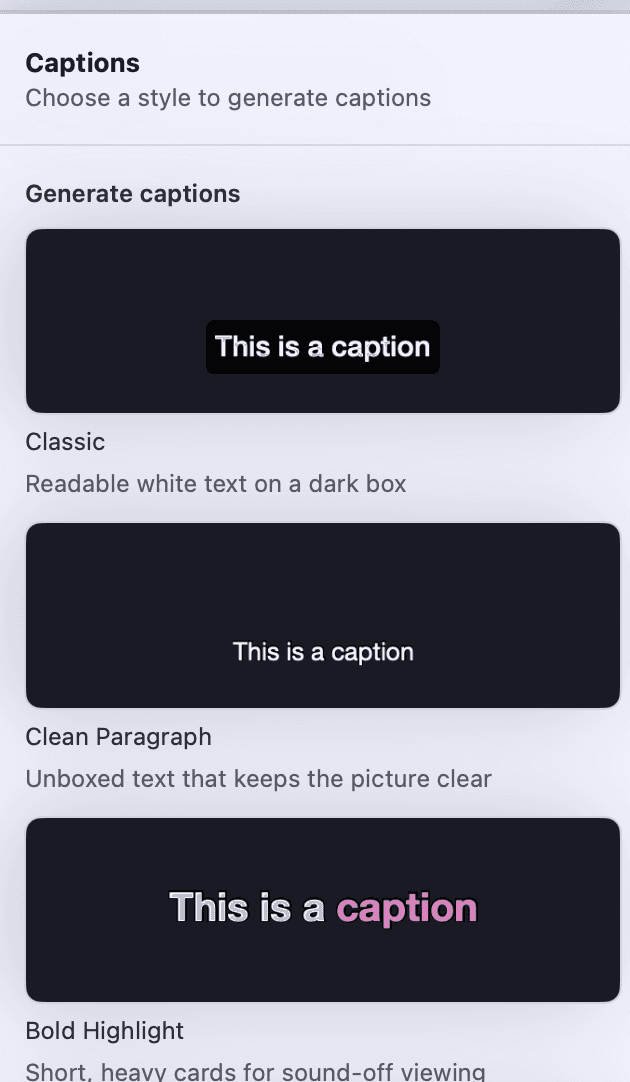
The preset gallery
Four styles, each drawn as a thumbnail as well as named, with the current one ticked. Picking one applies it and rebuilds the cards. A style you have adjusted keeps its card selected and the panel says so, with the way back to the preset in one place.
Typography
A font picker, a weight picker and a size slider, applied to every card in the project.
Colour
The text colour, the active word's colour where a style highlights one, a Highlight each word toggle, and a background box you can switch off or recolour. Every colour well supports opacity.
Legibility
An outline with its own width and colour, and a shadow with a radius, an offset and a colour. Zero means off for either. This is what keeps an unboxed caption readable over a busy picture.
Placement
Left, centre or right alignment, and a box you place on the canvas: click the captions, drag the box to move them, or drag a corner to change how wide they wrap at the same font size. The rail reads its X, Y, W and H in canvas pixels.
Cards
Characters per line and lines per card, as steppers on the selected captions' Adjust panel. Changing either reshapes the cues rather than restyling them, and the panel says so before you touch it.
Remove captions
Select the captions and press Delete, or choose Delete on the Captions row of the Layers list - removed the way any layer is, as an undoable edit like generating them was.
Every capability Rooster ships is listed on the features page, and how the work is split between your Mac and everything else is on how it works.
How to use it
Add captions to a video
Generate captions from a Rooster transcript in one click, set how much text sits on each card, fix a word, and rebuild them after transcribing again.
Style captions: font, colour, highlight, position
Change a caption style's font, size, colours and outline in Rooster, drag the captions where you want them, hide them in one scene, or save a look.
Export SRT or VTT subtitles
Save a Rooster project's captions as an SRT or WebVTT subtitle file for YouTube or any player, with your cuts and corrections applied.
What it does not do
- Word-by-word highlighting needs word timing, which the local engines produce. Where a transcript has none the toggle is disabled and the panel explains why, rather than lighting up nothing.
- Captions travel as one set. A change styles every card in the project; there is no per-card or per-word styling.
- Nothing in Rooster decides who is speaking. You can name a speaker yourself in the transcript, and the Captions list and the SRT and VTT sidecars say it - but the burned-in card never does.
- The panel lists the first 40 cues and says how many there are in total. It is a check on where the cards break, not a caption editor - the words themselves are corrected in the transcript.
- Captions are burned into the exported video. If you need them switchable for the viewer, that is what the SRT or VTT sidecar is for.
This list is here because the alternative is a reader installing Rooster and finding out. If one of these is the job you need done, the alternatives page ranks tools that do it.
Frequently asked questions
Do captions need a second transcription or an upload?
Neither. They are built from the transcript already in the project, using its timings, on your Mac. If the video has not been transcribed yet, the caption panel says so and points you at doing that first.
Can I change the font, the colour and where captions sit?
Yes. Font, weight and size; the text colour, the active word's colour and a background box with its own colour; an outline and a shadow, each of which can be set to zero to turn it off; and alignment. Where they sit is a box on the canvas: drag it to move the captions, drag a corner to change how wide they wrap, or type X, Y, W and H in the rail. In a project with scenes, each scene can place its captions on its own.
Does Rooster write SRT and VTT files?
Yes, from the same cues as the burned-in captions, with the same characters-per-line and lines-per-card limits. Both are export options alongside the video, audio-only M4A, uncompressed WAV, plain transcript and Markdown.
Why is "Highlight each word" greyed out?
Because that transcript has no word timing. Word-by-word highlighting needs it, so rather than draw a control that would do nothing, Rooster disables it and says which piece is missing.
Can I style one caption card differently from the rest?
No. Captions travel as one set in Rooster, so a style change applies to every card in the project.
The rest of the loop
Screen recording on your Mac
A display or one window, with Mac audio and your microphone, cropped to the shape you are publishing in.
Transcription that runs on your Mac
Parakeet or whisper.cpp running in Rooster's own process, with the word timings the rest of the editor is built on.
Removing filler words
Every hesitation in the transcript, played in context, cut as one undoable step when you approve it.
Studio Sound
DeepFilterNet 3 on your Mac, with a strength control and A/B playback before anything is kept.
Eye Contact
A restrained, on-device gaze correction with three strengths and A/B playback. Beta, and labelled so in the app.
The teleprompter in Rooster's recorder
A script window opened from the recorder that scrolls continuously, keeps the script with the project, and has mirror and flip settings for a beam splitter.