
Capability
Removing filler words
Remove filler words lists every hesitation the transcript contains, with the words either side and a button that plays the moment, so you hear it before deciding. Approve them one at a time or all at once, and the whole set is cut as a single undoable ripple edit.
Propose, review, apply
Detection is lexical: a spoken word in the transcript whose letters match a known hesitation. Nothing acoustic is involved. The list is deliberately narrow - um, uh, uhm, erm, er, ah, eh, hm, mm and hmm - and it is narrow on purpose. "mm-hmm" and "uh-huh" are backchannels that mean "yes, go on", so cutting them changes what the speaker said. "like" and "you know" are ordinary words in most sentences, and a lexical detector cannot tell a filler "like" from a comparison.
Nothing is cut until you approve it, and that is not caution for its own sake. Rooster's own engine evaluation measured Parakeet transcribing the word "them" as "um" in one fixture. A detector reading that transcript cannot tell the difference, because at that layer there is no difference - the transcript says "um". Applying automatically would delete a content word from the middle of a sentence and you would find out on playback.
So the review sheet shows each hesitation as transcribed, with the few words either side and its timestamp as a button that plays it. Tick the ones to remove, or select all, or none. The apply button names how many will go and how much time that takes out.
The cut itself is the same one you would get by selecting that word and pressing Delete: snapped to word boundaries and to measured silence, so filler removal cannot drift away from hand editing. The whole approved set lands as a single undoable step.
What is on screen
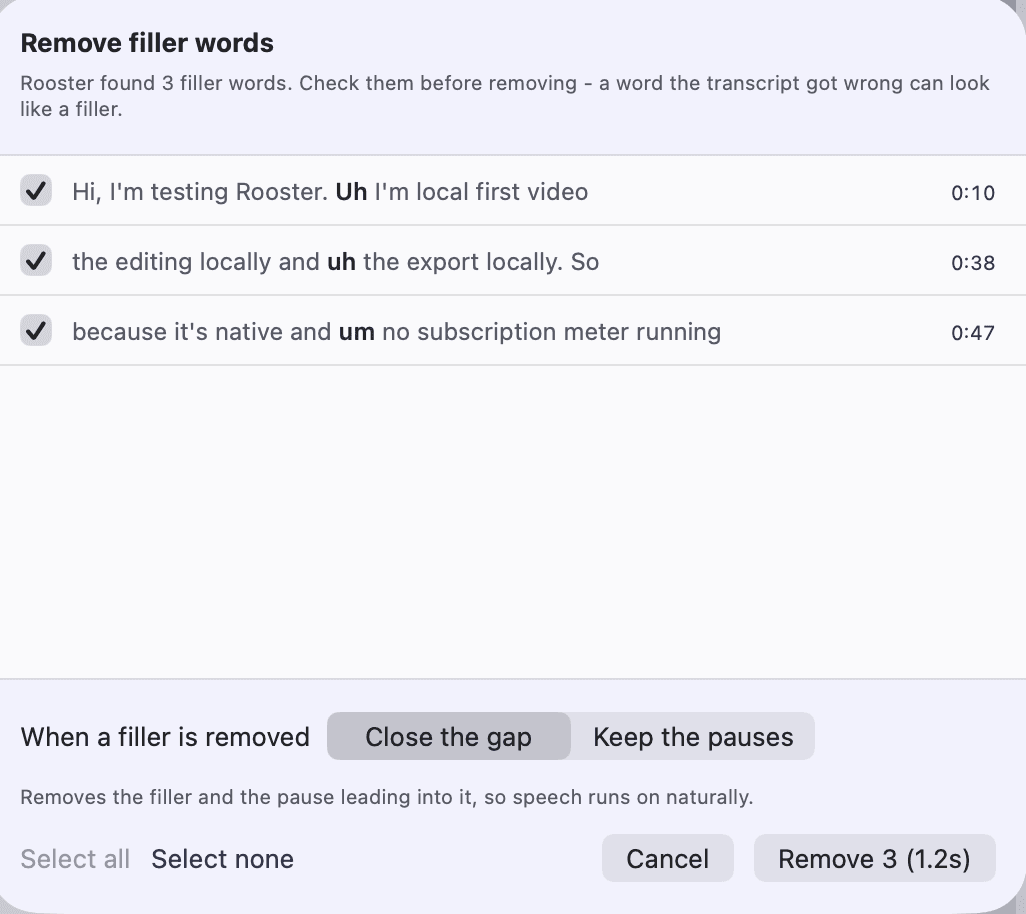
The review list
One row per hesitation: the word exactly as the transcript wrote it, the few words either side, a checkbox, and the timestamp as a button that plays that moment.
Select all, select none
For a clean recording where every instance is real, and for the opposite case where you would rather start from nothing and tick your way down.
When a filler is removed
Two options with an explanation under each. Close the gap removes the filler and the pause leading into it, so speech runs on naturally. Keep the pauses removes the filler and nothing else, leaving the silences either side to join into a longer one.
The apply button
It names the count and the duration - how many hesitations are approved and how much time removing them takes out - so the size of the edit is visible before it is made.
Where it opens from
The Enhance menu in the menu bar, which prints the name in full; the Enhance panel in the editor's rail, which names it beside a description; and a control on the script pane, which is the surface that owns the subject and where the cut acts from.
Every capability Rooster ships is listed on the features page, and how the work is split between your Mac and everything else is on how it works.
How to use it
Remove filler words
Find every um and uh in a Rooster transcript, listen to each one, and cut the ones you approve from the video in one step you can undo.
Clean up a video in one pass
Find filler words, long pauses, dead air, retakes and false starts in a Rooster video at once, cut them in one undoable step, then check each cut.
What it does not do
- The spellings are English. A transcript in another language yields no hesitations however the recording sounded.
- Detection is lexical, not acoustic. A hesitation the engine never wrote down cannot be found, and one it invented is offered to you like any other - which is why the review step exists.
- "like" and "you know" are not on the list, and neither are the backchannels "mm-hmm" and "uh-huh". Each would need its own false-positive story before it could be offered.
- A word with no timing is skipped, because there is no span to cut.
- A short list is not always a clean recording. Measured on Rooster's own fixtures, Parakeet keeps about four fillers in five while whisper.cpp as Rooster configures it keeps almost none, so Rooster records which engine wrote a transcript and tells you which of the two situations you are in.
- This tool does not look for words said twice or false starts. The Improve panel does: click Look for improvements and it looks for them in an English transcript alongside fillers, long pauses and the silence at each end, cuts the ones you leave ticked as one undoable step, then shows you each cut to play, keep or restore. Highlight ranges for short-form cuts are specified and not built.
This list is here because the alternative is a reader installing Rooster and finding out. If one of these is the job you need done, the alternatives page ranks tools that do it.
Frequently asked questions
Which words does Rooster treat as filler?
um, uh, uhm, erm, er, ah, eh, hm, mm and hmm. Backchannels like "mm-hmm" and "uh-huh" are excluded because they mean "yes, go on", and "like" and "you know" are excluded because a lexical detector cannot separate a filler from an ordinary use of the word.
Does Rooster cut filler words automatically?
No. It proposes and waits. Each instance is listed with its context and a play button, and nothing is removed until you approve it - individually, or all at once.
What happens to the pause where the filler was?
That is your choice. Close the gap removes the filler and the pause leading into it, which is what a hand-made delete does. Keep the pauses removes only the filler's own sound, so the silences either side survive and join.
Why did it find so few fillers in my recording?
Possibly because you did not say many, and possibly because the engine did not write them down. Rooster records which engine produced a transcript and how it was invoked, and says which of the two it is, rather than leaving you to conclude you never hesitated.
Can I undo it?
Yes. The whole approved set is applied as a single undoable step, so one undo puts every one of those words back.
The rest of the loop
Screen recording on your Mac
A display or one window, with Mac audio and your microphone, cropped to the shape you are publishing in.
Transcription that runs on your Mac
Parakeet or whisper.cpp running in Rooster's own process, with the word timings the rest of the editor is built on.
Captions from your own transcript
Four presets over the transcript's own timings, adjustable down to the outline, burned into the export and written as SRT and VTT.
Studio Sound
DeepFilterNet 3 on your Mac, with a strength control and A/B playback before anything is kept.
Eye Contact
A restrained, on-device gaze correction with three strengths and A/B playback. Beta, and labelled so in the app.
The teleprompter in Rooster's recorder
A script window opened from the recorder that scrolls continuously, keeps the script with the project, and has mirror and flip settings for a beam splitter.