
Capability
Studio Voice: remove background noise from video
Studio Voice removes background noise from video: it runs DeepFilterNet 3 on your Mac to separate speech from room noise. Pick a strength and generate; it renders while you keep editing, and its switch plays the original or the enhanced copy. It writes a separate file, never modifying your recording, and it costs processing time rather than credits.
What Studio Voice is for
Room tone, a noisy desk fan and the hollow edge of a small hard room are what it is for. The model is DeepFilterNet 3, running at 48 kHz as a local executable shipped inside Rooster, so the sheet's "DeepFilterNet 3 · 48 kHz · on-device" footnote is a description of where the work happens rather than a promise about a server.
There are two settings. Restoration strength is Natural, Balanced or Strong, which is how far the noise is allowed to be pushed down. Voice polish, on by default, tightens low rumble and adds a little speech presence on top of the separation.
Generate, and the sheet closes while the model runs: Studio Voice's row in the layer's Audio effects shows how far along it is, with a stop button, and you go on editing. Long videos take several minutes, because they do. When it finishes, the switch on its row plays the original or the enhanced copy, so you decide from listening rather than from a waveform.
Applying it points the project's sound at the enhanced copy, which Rooster records as an asset derived from the original. The file you recorded is never modified. If you do not like it, the row's adjust button opens the sheet again to run it at another strength, or Undo takes it off.
What is on screen
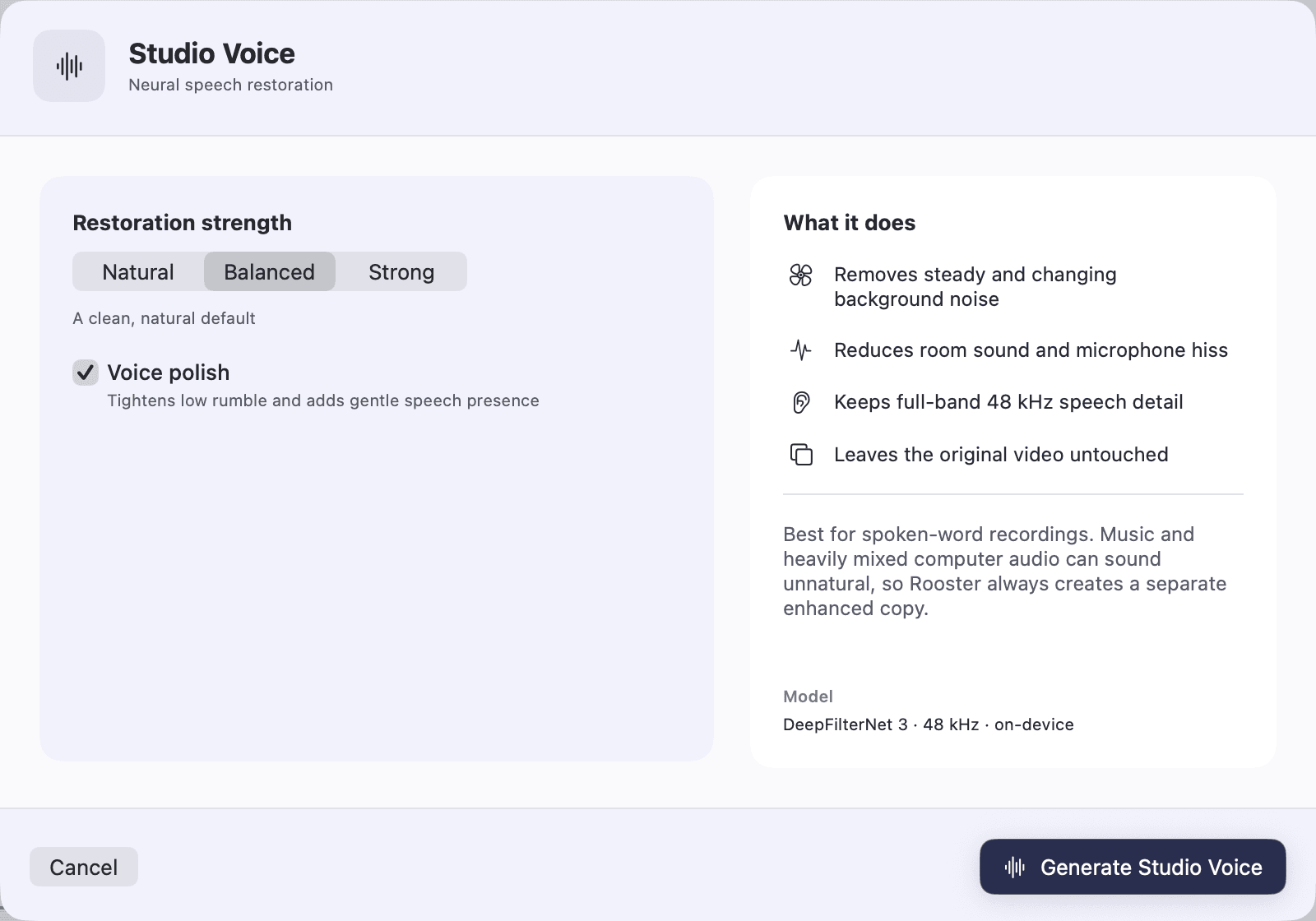
Restoration strength
Natural, Balanced or Strong, chosen before the run rather than tuned afterwards. Balanced is the default.
Voice polish
A toggle, on by default, that tightens low rumble and adds gentle speech presence after the separation has run.
Progress and stop on its row
Once you press Generate the sheet closes, and the row shows how far along the model is with a stop button beside it, while you go on editing. Long videos may take several minutes.
A and B with the switch
The switch on Studio Voice's row plays your original sound when off and the enhanced copy when on, straight away and without running the model again, so what you keep is what you heard.
Change the settings
The row's adjust button opens the sheet again. Generate runs the model at the new settings against the same original, and the result replaces the old copy as one step you can undo.
Where it opens from
The + beside Audio effects on the main recording's panel in Adjust, and the Improve menu in the menu bar.
Every capability Rooster ships is listed on the features page, and how the work is split between your Mac and everything else is on how it works.
How to use it
Clean up voice audio with Studio Voice
Remove background noise, room echo and hiss from a recording with Studio Voice, on your Mac, then switch it off and on to compare it with the original.
What it does not do
- Studio Voice runs on the project's primary recording. It is not a per-clip effect you can apply to one piece of B-roll or one music track on its own lane.
- Applying it is one step you can undo, and its switch in the layer's Audio effects turns it off and on without running the model again. Your original recording is untouched on disk either way.
- It is built for spoken word. Music and heavily mixed computer audio can sound unnatural through it, which is one reason Rooster always writes a separate enhanced copy rather than replacing anything.
- It costs time on your own machine rather than credits, and a long video costs several minutes of it.
- There is no manual equaliser, compressor or noise gate here. Strength and voice polish are the two controls, deliberately - and loudness is a separate question, answered once on the export sheet rather than per clip.
This list is here because the alternative is a reader installing Rooster and finding out. If one of these is the job you need done, the alternatives page ranks tools that do it.
Frequently asked questions
Does my audio go to a server?
No. The DeepFilterNet executable ships inside Rooster and runs on your Mac. Nothing is uploaded to clean up a recording, and there is no account or credit balance involved.
Does it change my original recording?
No. Rooster writes a separate enhanced file and points the project at it, recording it as an asset derived from the original. The file you recorded stays exactly as it was.
How long does it take?
It depends on your Mac and the length of the video, and Rooster does not pretend otherwise: its row shows progress while it runs, and a long video may take several minutes. You can go on editing meanwhile.
Can I hear it before I keep it?
Yes, with the switch on its row. Once it is applied, off plays your original sound and on plays the enhanced copy, straight away and without running the model again, and Undo takes it off. The + beside Audio effects applies it with your saved settings; Improve > Studio Voice… in the menu bar opens the sheet to choose a strength first, and either way it renders on its row while you keep editing.
Will it work on music?
It is not built for it. Music and heavily mixed computer audio can come back sounding unnatural, and the sheet says so where you are about to press the button.
Can Rooster even out the volume of a recording, like an audio leveler?
Yes, separately from Studio Voice. Select the main recording and, under Sound in the Adjust rail, Even out volume brings quiet and loud phrases to the level of the rest and leaves the pauses alone. It is on for every new project, and it applies in preview and export alike.
The rest of the loop
Screen recorder for Mac
A display or one window, with Mac audio and your microphone, cropped to the shape you are publishing in.
Video transcription software that runs on your Mac
Parakeet or whisper.cpp running in Rooster's own process, with the word timings the rest of the editor is built on.
Add captions to video on your Mac
Four presets over the transcript's own timings, adjustable down to the outline, burned into the export and written as SRT and VTT.
Remove filler words from video
Every hesitation in the transcript, played in context, cut as one undoable step when you approve it.
Eye Contact: AI eye contact correction on your Mac
A restrained, on-device gaze correction with three strengths and a switch on its row, so you can see what it changed.
Teleprompter for Mac, built into the recorder
A script window opened from the recorder that follows your voice or scrolls at a set rate, keeps the script with the project, and has mirror and flip settings for a beam splitter.
Remove background from video on your Mac
Green Screen takes the room away with Apple Vision on your Mac, or Blur Background softens it, with an edge control and a switch on each.
Add music to video on your Mac
Your own track on a Music lane, looped to fill the video, set under your voice and ducked while you speak.
Use Rooster from Claude, ChatGPT or Cursor
Claude, ChatGPT, Cursor or Claude Code edits your projects over MCP, on your Mac, one undo step per edit.