
Capability · Beta
Eye Contact
Eye Contact adjusts where you appear to be looking when you were reading a script rather than the lens. It is built on Apple's Vision framework, runs on your Mac, and offers three strengths with A/B playback, so the correction is something you accept rather than something applied behind your back.
A restrained correction, and a beta
It is labelled beta in the application and on this page for the same reason: it is a per-frame estimate of where a person is looking, and on some footage the right answer is to leave it off. That is not a disclaimer bolted onto a finished feature - it is why the badge is in the interface too.
What it does is geometric rather than generative. It does not paint new eyes onto your face; it corrects the ones that are there, within limits it keeps deliberately: the largest visible face, skipping blinks and strong head turns, smoothing movement between frames so a correction does not flicker from frame to frame.
Three strengths decide how far it goes. Subtle makes small corrections with the most natural motion. Balanced is the default for reading near the camera. Strong is for a larger offset between where you were looking and where the lens is.
Rendering happens on your Mac, with progress while it runs. When it finishes you can play the original against the corrected version and keep whichever you prefer. Keeping it points the project at the corrected copy; the file you recorded is never modified.
What is on screen
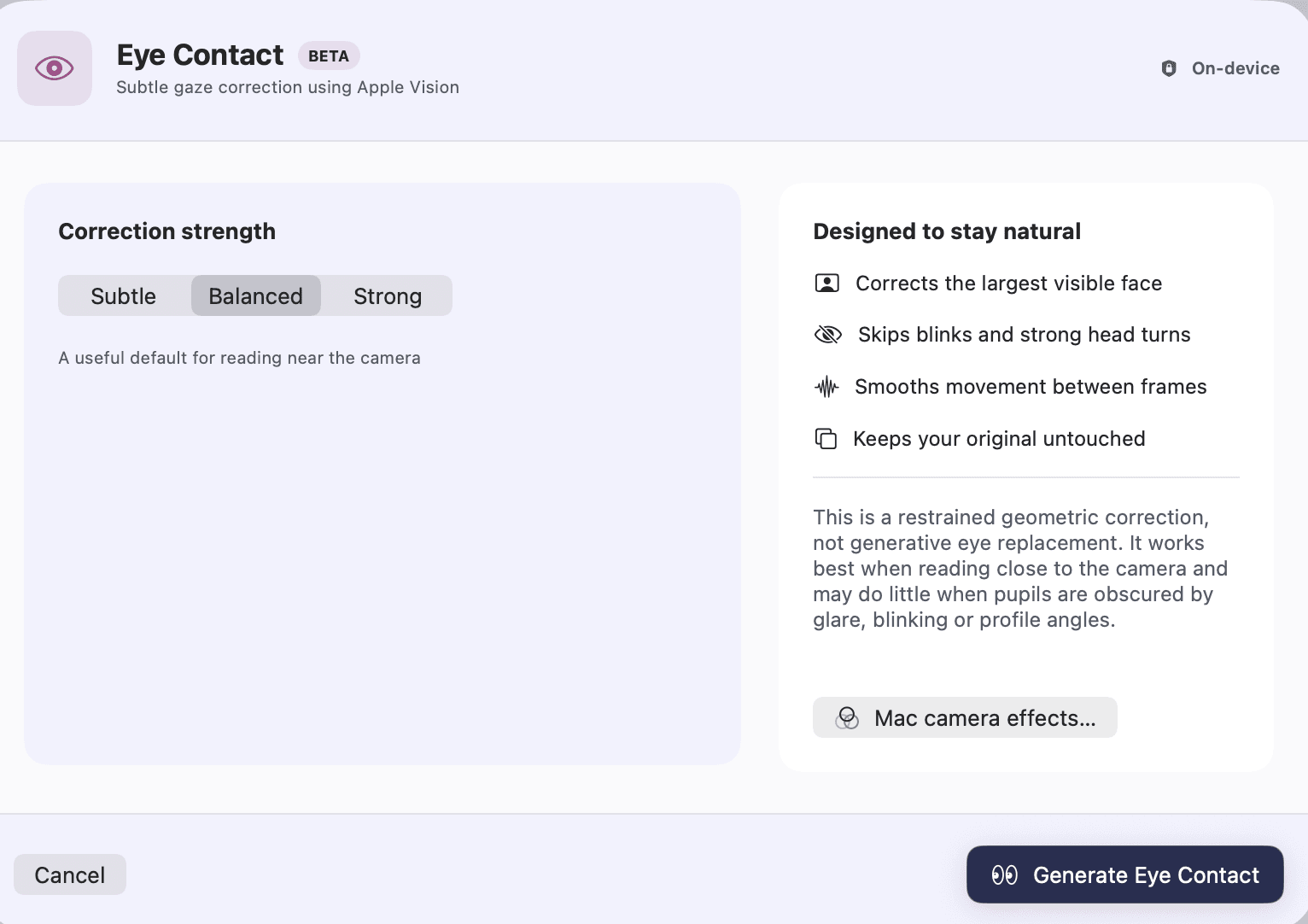
Correction strength
Subtle, Balanced or Strong on a segmented picker, with a line beneath it saying what the selected strength is for, chosen before the render rather than tuned afterwards.
Progress and Stop
A progress line while eyes are tracked and a corrected copy is rendered, with Stop beside it.
Original and Eye Contact playback
Two play buttons over the same passage. The correction is subtle by design, so comparing them is the only honest way to judge it.
Use corrected version, or try a different strength
Keeping it points the project at the corrected copy. Trying again renders from the same original at another strength.
Mac camera effects
A button that opens macOS's own video-effects panel - Portrait, Studio Light, Centre Stage - because those belong to the system rather than to Rooster, and pretending otherwise would be a control that lies about who owns it.
Where it opens from
The Enhance menu in the menu bar, which carries the beta label and a keyboard shortcut, and the effects panel in the editor's rail.
Every capability Rooster ships is listed on the features page, and how the work is split between your Mac and everything else is on how it works.
How to use it
Fix eye contact in a video
Make it look as if you are looking into the camera while you read from a screen, with Rooster's on-device Eye Contact correction. It is in beta.
What it does not do
- It is a beta. On some footage it is better left off, and the application says so rather than burying it here.
- It corrects the largest visible face. A second person in frame is not corrected.
- It may do very little when the pupils are obscured - glare on glasses, a blink, a profile angle. It works best when you are reading close to the camera.
- It is a geometric correction, not generative eye replacement. It will not manufacture eyes that were never visible.
- It runs on the project's primary recording, not on a single clip on the B-roll lane.
- Keeping the corrected version is not an undo step. Your original recording is untouched on disk and you can render again at another strength, but Undo does not take it back.
This list is here because the alternative is a reader installing Rooster and finding out. If one of these is the job you need done, the alternatives page ranks tools that do it.
Frequently asked questions
Is Eye Contact finished?
No, and Rooster labels it beta in the application, in the menu bar and on this page. It estimates where a person is looking frame by frame, and on some footage the honest answer is to leave it switched off.
Does my video leave the Mac?
No. It is built on Apple's Vision framework and renders on your machine. Nothing is uploaded, and there is no credit balance behind it.
Does it work if I wear glasses?
Sometimes, and the application says as much: where glare, a blink or a profile angle hides the pupils, the correction does very little. That is a deliberate limit rather than a failure - a guess made on hidden eyes is what makes this kind of effect look wrong.
Can I compare it against the original before keeping it?
Yes. When the render finishes there are two play buttons, Original and Eye Contact, over the same passage, and nothing is applied to the project until you press Use corrected version.
Does it change my original file?
No. Rooster renders a corrected copy and points the project at it. The recording you made stays exactly as it was.
The rest of the loop
Screen recording on your Mac
A display or one window, with Mac audio and your microphone, cropped to the shape you are publishing in.
Transcription that runs on your Mac
Parakeet or whisper.cpp running in Rooster's own process, with the word timings the rest of the editor is built on.
Captions from your own transcript
Four presets over the transcript's own timings, adjustable down to the outline, burned into the export and written as SRT and VTT.
Removing filler words
Every hesitation in the transcript, played in context, cut as one undoable step when you approve it.
Studio Sound
DeepFilterNet 3 on your Mac, with a strength control and A/B playback before anything is kept.
The teleprompter in Rooster's recorder
A script window opened from the recorder that scrolls continuously, keeps the script with the project, and has mirror and flip settings for a beam splitter.